
Setup Configuration#
For the Daxtra Search Nexus integration to work a Daxtra environment must already exist. The integration in Pump utilises this environment, provided in the form of a standard URL, which is manipulated according to the search the user performs and the record that the search is initiated from.
❗Please note: Contact your Daxtra account manager to obtain the relevant URL. Typically, the URL will be: https://search-[ACCOUNT_NAME].daxtra.com
Global Settings#
There are two settings to configure in Pump to enable the integration. These can be found under the Daxtra Search Nexus Integration tab in the Master Global Settings Record.

Firstly, the Daxtra Search Nexus Enabled field must be changed to Yes. This setting fundamentally enables the integration.
Secondly, the Daxtra Search Nexus URL field must be populated with the URL of your Daxtra environment.
❗Please note: The URL must be prefixed with https:// and the end of the URL must not be appended with any other characters.
User Configuration#
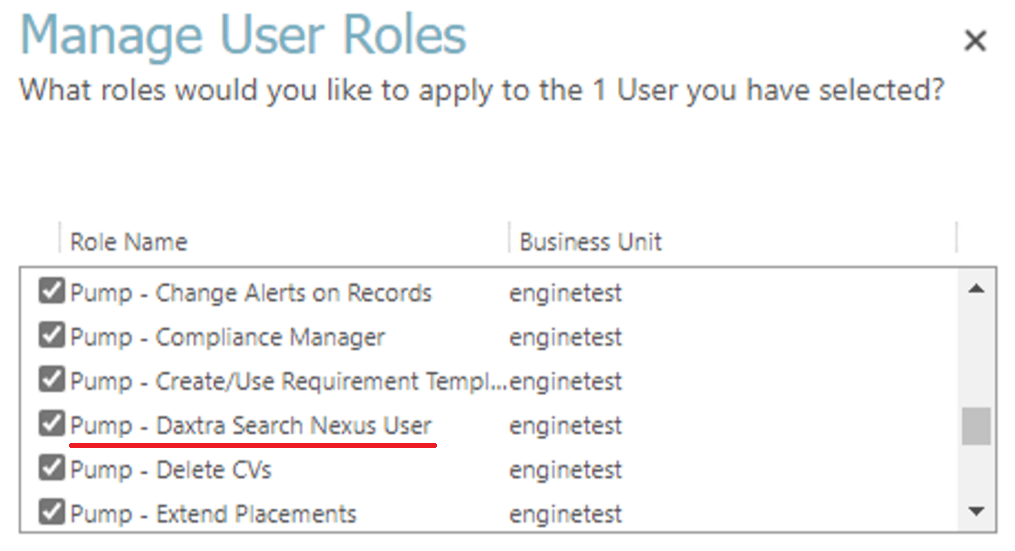
The final step to enable the integration is to assign the Pump - Daxtra Search Nexus User role to each user who requires the ability to search using Daxtra Search Nexus.
Using the Integration#
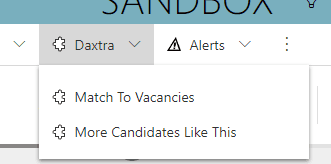
When the role and the global settings are configured correctly, the following buttons will appear when viewing the Person and Requirement forms.
Person:
Requirement:
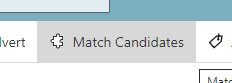
Clicking any of the options above will open Daxtra Search Nexus in a new web browser, appropriate to the record selected in Pump.